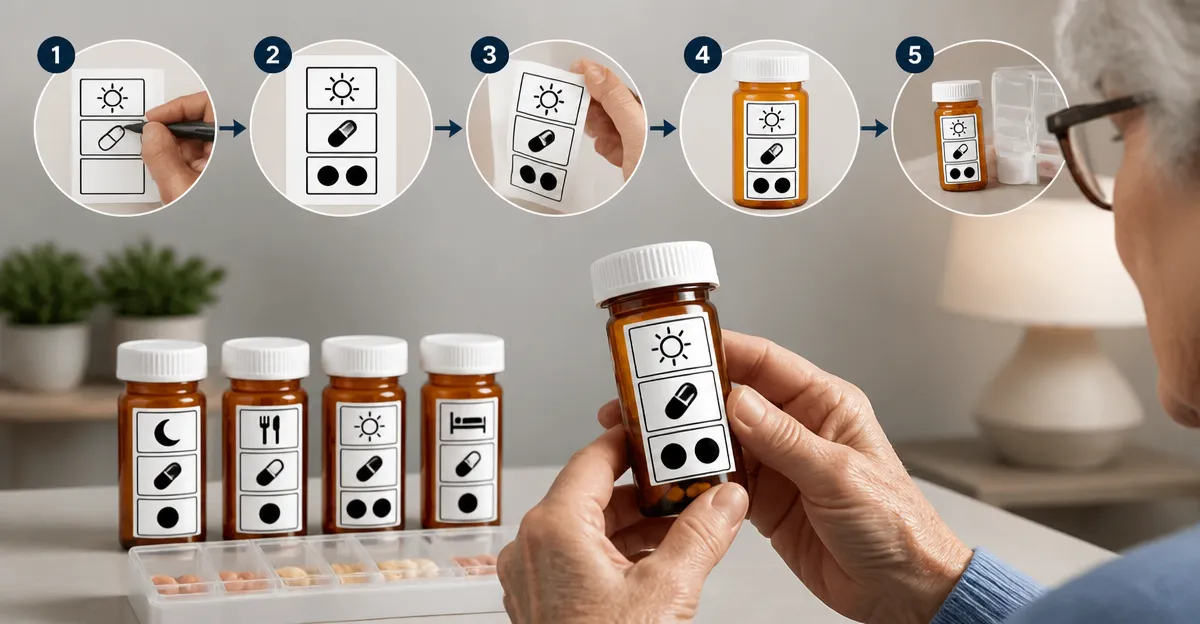
How to Create a High-Contrast Medication Label System for Low-Vision Seniors: A Step-by-Step Guide to Safer, Easier Medication Management
Introduction
Managing multiple prescriptions can be daunting for anyone, but seniors with low vision face additional challenges that increase the risk of missed doses or accidental overdoses. This guide will teach readers how to design a high‑contrast labeling system that simplifies daily medication routines, reduces errors, and promotes independence. By the end of the article, one will understand the principles of contrast, the importance of tactile cues, and how to integrate practical tools such as pill organizers into a cohesive system.
The approach combines inexpensive labeling supplies with three carefully selected pill organizers that address common obstacles such as limited dexterity, arthritis, and the need for clear visual separation between morning and evening doses. The steps are organized so that each phase builds on the previous one, ensuring a logical progression from assessment to implementation.
Although the guide recommends specific products, the concepts can be applied with alternative items that meet the same criteria. The focus remains on safety, usability, and the creation of a reliable visual language that low‑vision seniors can trust.
Readers are encouraged to follow the instructions methodically, test the system for a few days, and adjust any element that does not meet personal preferences or environmental constraints.
What You'll Need
- High‑contrast label sheets or printable stickers (black text on white or yellow background).
- Fine‑point permanent marker for custom notes.
- Scissors or a paper cutter.
- Three pill organizers that provide easy‑open features, large capacity, and clear day/AM‑PM differentiation:
- Labeling tape or adhesive‑backed plastic sleeves for durability.
- Optional: Small magnifying glass for initial label placement.
Step 1: Assess the Medication Schedule
The first step is to create a master list of all medications, including dosage, frequency, and any special instructions such as “take with food” or “avoid sunlight.” Write this information on a spreadsheet or a notebook, then group the medicines by the time of day they must be taken. For seniors who require more than two daily doses, consider dividing the schedule into morning, midday, evening, and bedtime slots.
During this assessment, note any pills that are large, coated, or require a specific orientation. Those details will influence the choice of compartment size in the pill organizers. It is also essential to verify that the list matches the prescription labels to avoid transcription errors.
Once the schedule is documented, rank each medication by its visual complexity: high‑contrast pills (e.g., white tablets) are easier to identify than low‑contrast ones (e.g., pale pink capsules). This ranking will guide the allocation of high‑contrast labels later in the process.
Having a clear, written schedule serves as the blueprint for the labeling system and prevents the need for guesswork when filling the organizers.
Step 2: Choose High‑Contrast Label Materials
Select label sheets that provide a stark contrast between text and background. Black ink on a yellow or white background is the most legible for low‑vision users, as the human eye perceives yellow as a bright, attention‑drawing hue. If printable stickers are unavailable, standard white adhesive labels can be used with a bold black marker.
Cut the labels to fit the size of each pill compartment. For the Colorwing XL AM/PM 7-Day Pill Organizer, the compartments are large enough to accommodate a 2‑inch by 1‑inch label without obscuring the day or AM/PM indicator.
Write the medication name in all caps, followed by the dosage strength, using a fine‑point permanent marker to ensure durability. For example: “ASPIRIN 81 MG”. If space permits, add a short cue such as “WITH FOOD”. Seal the label with clear tape or a thin plastic sleeve to protect it from moisture.
Prepare a master set of labels for each day and each dosing time before moving on to filling the organizers. This pre‑work reduces the likelihood of mixing up compartments during the busy filling stage.
Step 3: Organize Pills by Time Using the Right Pill Organizer
The third step involves selecting the appropriate organizer for each dosing frequency. The Colorwing XL AM/PM 7-Day Pill Organizer is ideal for seniors who take medication twice daily because it offers separate AM and PM compartments for each day, clearly labeled with contrasting colors. Its extra‑large capacity can hold up to 20 large vitamins per compartment, making it suitable for patients with bulky tablets or multiple supplements.
Key features of the Colorwing organizer include an easy‑to‑open latch designed for arthritic hands, BPA‑free construction, and a perspective‑visible window that shows whether the day’s dose has been taken. These attributes reduce the physical effort required to open compartments and provide a visual cue that reinforces adherence.
For individuals who require a single daily dose or who experience difficulty with small lids, the Auvon 7-Day Arthritis‑Friendly Pill Box offers a spring‑assisted open design. The rubber‑strip mechanism allows one‑handed operation, and the brightly colored lids with clear date markings make it easy to locate the correct compartment at a glance.
If the medication regimen includes three or four daily doses, the Daviky 7-Day 4x Daily Pill Organizer provides four distinct slots per day (morning, midday, evening, bedtime) plus a backup compartment. Its removable daily trays enable seniors to carry only the day’s doses when traveling, while the bold printed labels resist wear for thousands of uses.
By matching each organizer to the specific dosing frequency, one minimizes the number of compartments a senior must search through, thereby decreasing the cognitive load and the risk of selecting the wrong pill.
Step 4: Apply Labels to the Compartments
With the high‑contrast labels prepared, begin affixing them to the appropriate compartments. Start with the morning (AM) slots of the Colorwing organizer, then proceed to the afternoon (PM) slots, followed by the Auvon and Daviky units. Ensure that each label aligns with the pre‑printed day or time indicator so that the visual hierarchy remains consistent.
If the organizer’s surface is glossy, lightly rub a piece of tape on the label first to improve adhesion. Press the label firmly for at least ten seconds to guarantee a secure bond. For added durability, especially in humid environments, cover the label with a thin layer of clear self‑adhesive film.
After labeling, place a small piece of bright‑colored tape on the outside of each compartment as a tactile cue. Seniors who rely on touch can feel the tape’s texture, confirming that they have opened the correct slot without needing to read the text.
Finally, perform a quick visual inspection under a well‑lit environment to verify that all labels are legible and correctly positioned. Adjust any misaligned labels immediately to avoid confusion later.
Step 5: Fill the Organizers and Conduct a Test Run
Using the master medication list, distribute the pills into their designated compartments. Begin with the largest tablets to ensure they fit comfortably, then place smaller capsules around them. The Colorwing organizer’s oversized compartments can accommodate up to 20 large vitamins, which is useful for seniors who take multiple supplements simultaneously.
After filling, close each lid securely and observe whether the spring‑assist mechanism of the Auvon box clicks into place. For the Daviky organizer, verify that each daily tray slides out smoothly and that the backup compartment remains empty unless a spare dose is required.
Conduct a test run by walking through a typical day: open the morning compartment, retrieve the pills, and check the visual cue (e.g., the perspective window on the Colorwing case) to confirm that the dose has been taken. Repeat for each dosing time. This rehearsal helps identify any ergonomic issues, such as lids that are too stiff or labels that are difficult to read.
If any problem arises, adjust the system accordingly—replace a label with a larger font, add an extra tactile marker, or consider switching to a different organizer that better matches the user’s hand strength.
Tips & Pro Tips
- Use consistent color coding. Assign a single color to each time of day (e.g., blue for morning, orange for evening) and apply that color to both the label background and any tactile tape.
- Maintain a weekly refill schedule. Set a reminder on a smartphone or a wall calendar to restock the organizers every Sunday, preventing missed doses due to empty compartments.
- Leverage technology. Some smartphones have built‑in voice assistants that can announce the medication schedule when prompted, providing an additional safety net.
- Store organizers in a well‑lit area. Natural daylight or a bright LED lamp enhances contrast, making the labels easier to read.
- Consider backup containers. Keep a small, clearly labeled emergency pill bottle for each critical medication in case the primary organizer is misplaced.
Troubleshooting
| Problem | Possible Cause | Solution |
|---|---|---|
| Labels fade after a week | Moisture or low‑quality adhesive | Cover labels with clear self‑adhesive film or switch to waterproof label stock. |
| Lids are difficult to open | Arthritis or stiff spring mechanism | Use the Auvon Arthritis‑Friendly box for those compartments or apply a small silicone grip pad. |
| Wrong pill taken | Similar‑looking tablets or misaligned labels | Add a tactile marker (e.g., a rubber dot) and double‑check the label before each dose. |
| Organizer spills during travel | Improper closure | Ensure the snap‑shut mechanism on the Auvon box is fully engaged; consider the removable trays of the Daviky organizer for travel. |
Conclusion
Creating a high‑contrast medication label system empowers low‑vision seniors to manage their prescriptions with confidence and independence. By assessing the medication schedule, selecting appropriate high‑contrast materials, and integrating ergonomic pill organizers such as the Colorwing XL AM/PM, Auvon Arthritis‑Friendly, and Daviky 4x Daily models, one can build a robust, user‑friendly system that minimizes errors.
The step‑by‑step approach outlined in this guide ensures that each component—from label design to final testing—is purposeful and evidence‑based. Seniors and caregivers are encouraged to personalize the color scheme, tactile cues, and refill routine to suit individual preferences.
Implementing these practices not only improves medication adherence but also enhances overall quality of life by reducing anxiety associated with daily pill management.
One should revisit the system periodically, especially after any change in medication or visual acuity, to maintain its effectiveness over time.
Products Mentioned in This Guide
Colorwing XL AM/PM 7-Day Pill Organizer
Price: See Amazon. Rating: Not listed.
Features: Extra‑large capacity (holds up to 20 large vitamins per compartment), easy‑to‑open latch for arthritis, BPA‑free ABS outer shell, perspective visible window indicating taken doses.
Auvon 7-Day Arthritis‑Friendly Pill Box
Price: See Amazon. Rating: Not listed.
Features: Spring‑assisted one‑handed opening, BPA‑free food‑grade material, color‑coded lids with clear date markings, secure snap‑shut lock to prevent dumpage.
Daviky 7-Day 4x Daily Pill Organizer
Price: See Amazon. Rating: Not listed.
Features: Four daily compartments plus backup, removable daily trays for travel, bold printed labels resistant to wear, BPA‑free solid ABS construction.
Frequently Asked Questions
What is a high‑contrast medication label and why is it important for low‑vision seniors?
It uses bold colors and clear fonts to make text stand out, helping seniors read labels quickly and reducing medication errors.
How can I create high‑contrast labels with inexpensive supplies?
Print labels using black text on white or yellow backgrounds, or use a label maker with high‑contrast settings, then attach them securely to pill containers.
Which features should I look for in a pill organizer for seniors with limited dexterity?
Choose organizers with large, easy‑to‑open compartments, tactile markers, and separate sections for morning, afternoon, and evening doses.
How do tactile cues complement visual contrast in a medication system?
Raised symbols, braille, or textured stickers provide a non‑visual way to identify pills, aiding users who cannot rely solely on sight.
What steps should I follow to set up a complete high‑contrast labeling system?
Assess medication needs, select a suitable organizer, create high‑contrast labels, add tactile markers, and regularly review the system for accuracy.